WiTcontroller
Instructions for Forking the code
If you plan to modify the code it is recommended that you create your own GitHub fork of my repository and post your mods there.
That way:
- It is easier to accept any changes I make in my origin repository. </br> Git will generally merge the changes automatically. (Rather you than manually patching each each time.)
- You can, if you wish, send your changes to me, via Pull Requests from your fork, for inclusion in the origin
- It is easier for other people to pull down your version, and any subsequent changes to your version, to try it out without effecting their other versions.
Required Software
- GitHub Desktop (or similar)
- Arduino IDE or Visual Studio Code (VSC)
[!NOTE] Visual Studio Code is far superior to the Ardunio IDE for this type of coding.
Procedure
Procedure Overview
Ideally the cycle would look like this..
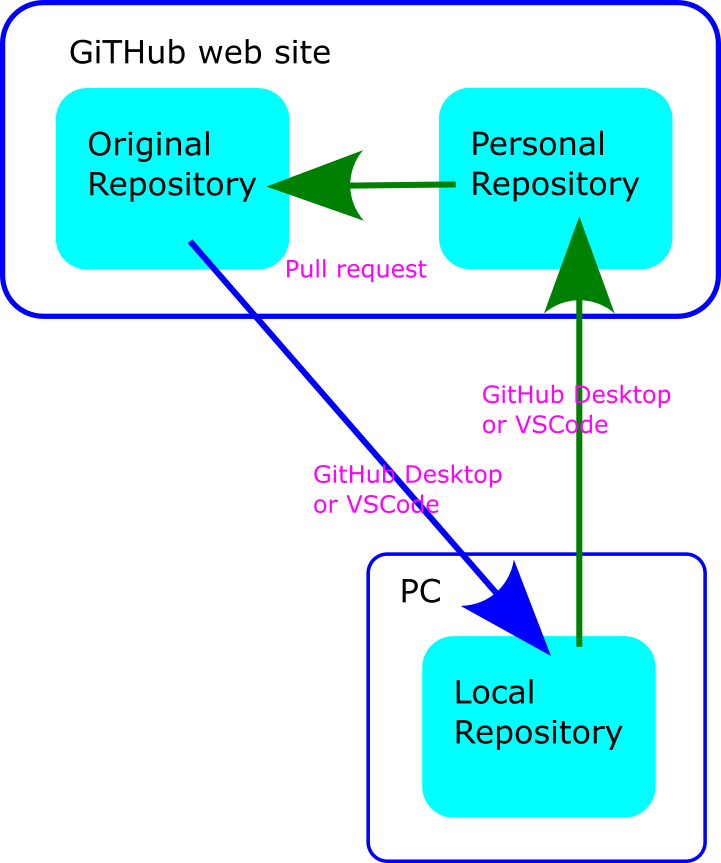
Changes to the original would be pulled down from the origin repository directly to your local (PC) repository. You would push your changes to your GitHub website repository. Then create a Pull request to send them to the origin for review.
While this is possible, both GitHub Desktop and VSCode make it extremely cumbersome to do so.
So instead a slightly longer approach is described below…
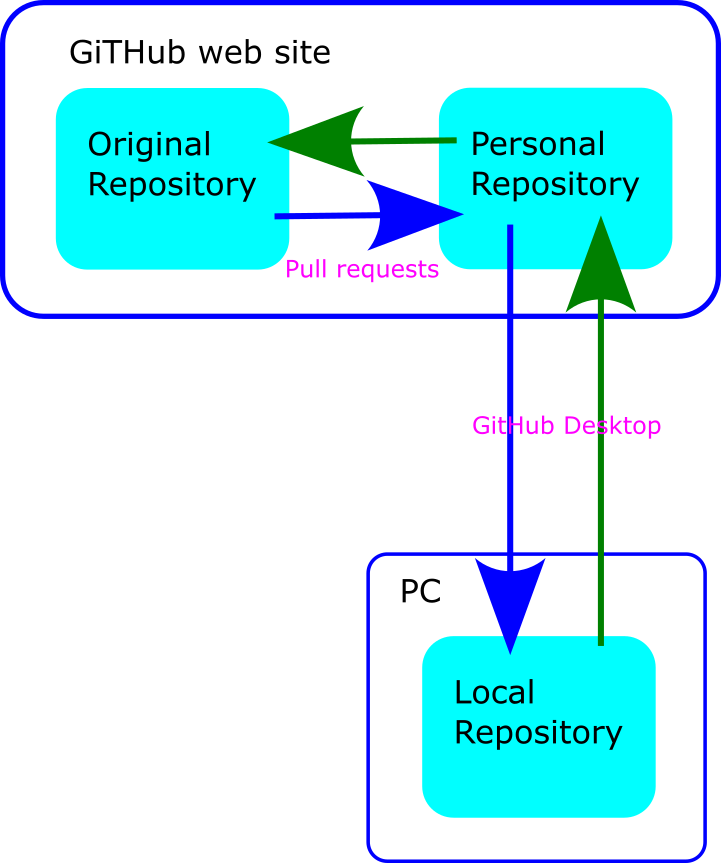
Changes to the original would be pulled down from the origin repository to your GitHub website repository with a Pull Request. You will then pull those changes to you local (PC) repository. You will push your changes to your GitHub website repository. Then create a Pull Request to send them to the origin for review.
There are a number of possible ways to do this but the instructions below are reasonably simple and work:
One time only:
- Cloning the repository on the GitHub website
- Using GitHub Desktop to download the repository to your PC
Ongoing:
- Opening the repository in the Arduino IDE or VSCode
- Making your changes
- Preview/run your changes on your PC
- Using GitHub Desktop to push your changes back to your clone of the Repository on GitHub
- Creating a pull request to send your changes for review
You will periodically need to update your repository:
- Create a pull request on the GitHub website to get any changes from the original repository to your repository on GitHub website
- Use GitHub Desktop to pull the changes to your repository on your PC
One time only
1. Cloning the repository on GitHub website
- First you will need to create an account on Github if you don’t already have one.
- Go to the origin repository
https://github.com/flash62au/WiTcontroller - Click on the
Forkbutton and create a new fork.
You will now have a new fork located at https://github.com/<your_account_name>/WiTcontroller (or whatever you called it). Take note of this for the next step.
2. Download the repository to your PC with GitHib Desktop
In GitHub Desktop:
- Select
File–>Clone Repository - Enter the name of you repository
<your_account_name>/WiTcontroller(or whatever you called it). - Select a location on your PC to store the repository.
- Click
Clone
A copy of the repository should now be on the PC.
If you are using VSCode, you can open it in VSCode by selecting Repository -> Open in Visual Studio Code
Ongoing
3. Open the repository in VSCode
You can open the repository in the Arduino IDE or VSCode at any time by using File –> Open Folder and navigating to the folder you selected in step 2.
You can subsequently open the repository in VSCode using File –> Open Recent and selecting the repository name.
You can subsequently open the repository in VSCode from GitHub Desktop.
4. Make your changes
You can use the navigation tree on the left to find the file you want to change. Clicking on a file will open it in the edit window.
Test your changes!
5. Push your changes to your GitHub repository
You will need to
- Commit your changes
- Push your changes
In GitHub Desktop:
- Open/select the repository
- note and review the changes that have been made
- Add a
Summaryof your changes - Add a
Descriptionof your changes, if the summary is not sufficient space - click
Commit to Main - click
Push origin
6. Creating a pull request to send your changes for review
- Open the GitHub website
- Open/select your repository
https://github.com/<your_account_name>/WiTcontroller(or whatever you called it)
On the ‘code’ page you should see “This branch is x commit(s) ahead of DCC-EX/dcc-ex.github.io:sphinx.”
- Click on the
x commit(s) ahead ofhyperlink - Confirm or add to the
titleanddocumentationfields - Click on the
Create pull requestbutton
This creates a Pull Pequest to be reviewed by the developer (flash62au).
Periodic
To see the changes that other people have made to the origin repository you need to periodically refresh your repository on both GitHub website and locally
a. Get any changes to your repository on GitHub website
- Open the GitHub website
- open/select your repository
https://github.com/<your_account_name>/WiTcontroller(or whatever you called it)
On the ‘code’ page you should see “This branch is x commit(s) behind flash62au/WiTcontroller.”
If does not say you are ‘behind’ there is nothing to do. Stop here.
If you are behind…
- Click on the
x commit(s) behindhyperlink - Click on the
Create pull requestbutton - Add to the title and/or documentation fields. This does not matter so entering just
Catchupis fine. - Click on the
Merge pull requestbutton - Click on the
Confirm mergebutton
Any changes are now also in your repository on the GitHub website.
b. Pull the changes to your repository on your PC
In GitHub Desktop:
- Click on the
Fetch originbutton`
Any changes are now also in your repository on your PC.